
Disclosure: As an Amazon Associate, Arthritis Wares earns from qualifying purchases at no extra cost to you. We are not paid or sponsored by any manufacturer. Affiliate links help support our work.
Sitting at a desk for several hours can be uncomfortable when arthritis affects your hips, knees, back, shoulders, hands, or wrists. A chair that looks ergonomic on paper may still be a poor fit if the seat is too deep, the armrests are at the wrong height, or the controls are difficult to operate.
The goal is not to find a chair specifically marketed for arthritis. It is to find a chair that lets you adjust the parts that matter most for your body and the way your arthritis affects sitting.
This guide compares seven ergonomic office chairs and explains the features worth looking for before you buy.
Quick Answer
For arthritis, prioritize an office chair with:
- Adjustable seat height so your feet can rest comfortably on the floor
- Appropriate seat depth so the seat does not press behind your knees
- Adjustable lumbar support if lower-back support is important to you
- Adjustable armrests that allow your shoulders to relax
- Comfortable, supportive seat cushioning
- Recline and tilt adjustments so you are not locked into one position
- Controls that are easy to reach and operate
- A return policy that gives you an opportunity to determine whether the chair actually suits your body
The most important feature depends on where you experience discomfort.
If your hands are affected: pay particular attention to how easy the adjustment controls are to operate.
If your shoulders are affected: prioritize adjustable armrests.
If your hips are affected: pay close attention to seat cushioning, seat depth, and the front edge of the seat.
If your lower back is the main concern: look for adjustable lumbar support and a chair that allows you to change your sitting position.
2026 Office Chair Comparison
| Chair | Notable Feature | Potentially Useful For | Cushioning | Price Level |
|---|---|---|---|---|
| SIHOO Doro C300 Pro V2 | Adaptive lumbar support | People prioritizing lumbar adjustability | Mesh | $$ |
| Duramont Pro+ 2026 | Adjustable lumbar and armrests | Long periods of desk work | High-density foam | $$$ |
| Nouhaus Ergo3D 2026 | Dynamic lumbar and 4D padded armrests | People prioritizing arm and shoulder support | Mesh | $$$$ |
| La-Z-Boy Delano 2026 | Plush cushioning and waterfall-style seat edge | People who prioritize cushioned seating | Memory foam | $$$$ |
| Steelcase Series 1 | Extensive adjustability | People who want precise adjustments | Foam | $$$$ |
| Hbada E3 Pro | Adjustable controls and flip-up arms | People who value easy access to adjustments | Mesh | $$ |
| Amazon Basics Executive High-Back | Simple padded design | People seeking a lower-cost option | Foam | $ |
Prices are shown as relative categories rather than fixed prices because Amazon pricing can change.
What Makes an Office Chair Arthritis-Friendly?
An arthritis-friendly office chair does not need a special medical label. Instead, look for features that make sitting, changing position, and adjusting the chair easier.
Adjustable Seat Height
Your feet should be able to rest comfortably on the floor while your legs are supported by the seat.
A chair that is too high can leave your feet unsupported. A chair that is too low may put your knees and hips in an uncomfortable position.
The important point is adjustability. There is no single seat height that works for everyone.
Also consider the chair’s adjustment mechanism. If finger stiffness or reduced grip strength makes small levers difficult to operate, an otherwise excellent chair may become frustrating to use.
Seat Depth
Seat depth is easy to overlook when shopping for an office chair.
If the seat is too deep, the front edge can press against the area behind your knees or make it difficult to sit back against the backrest. If it is too shallow, your thighs may not receive enough support.
When sitting normally, you should be able to sit back against the chair while still having a small gap between the front edge of the seat and the backs of your knees.
This can be particularly important if arthritis affects your knees or hips.
Adjustable Lumbar Support
If lower-back discomfort is one of your main concerns, look for lumbar support that can be adjusted rather than a fixed cushion that may or may not fit your body.
Useful adjustments may include:
- Lumbar height
- Lumbar depth
- Backrest recline
- Recline tension
The objective is to find a position that feels supportive without forcing your back into an uncomfortable posture.
Adjustable Armrests
Armrests can make a surprisingly large difference when arthritis affects the shoulders, elbows, or wrists.
Ideally, you should be able to adjust them so your shoulders remain relaxed and your arms are supported while you work.
Depending on the chair, useful adjustments may include:
- Height
- Width
- Forward and backward position
- Pivoting or inward/outward movement
Padded armrests may also be preferable if firm surfaces are uncomfortable against sensitive joints.
Seat Cushioning
Seat comfort is highly individual.
Some people prefer firm foam with relatively little movement, while others prefer thicker or softer cushioning. Memory foam and other layered cushions may feel comfortable to some users, but softer is not automatically better.
Pay attention to:
- Cushion thickness
- Firmness
- Pressure around the hips
- Pressure beneath the thighs
- The shape of the front edge
- Whether the cushion remains comfortable after sitting for an extended period
A waterfall-style front edge may be worth considering if you find conventional seat edges uncomfortable beneath your thighs.
Recline and Tilt
Being able to change your sitting position can be useful when sitting for long periods.
Look for a chair that allows some combination of:
- Backrest recline
- Tilt tension adjustment
- Tilt lock
- Adjustable seat or back position
You do not need to remain in one “perfect” posture all day. A chair that allows comfortable position changes may be more practical than one that forces you to sit rigidly in a single position.
Easy-to-Use Controls
This feature deserves extra attention for people with hand or finger arthritis.
Look for controls that are:
- Easy to reach
- Large enough to locate without looking
- Smooth to operate
- Accessible from a normal sitting position
- Not excessively stiff
A chair can have excellent ergonomic features but still be a poor choice if you cannot comfortably adjust it.
Which Features Matter Most for Different Arthritis Concerns?
Rather than choosing a chair based solely on the type of arthritis you have, think about which parts of your body become uncomfortable while sitting.
| Main Concern | Features to Prioritize |
|---|---|
| Hips | Comfortable cushioning, appropriate seat depth, supportive seat edge |
| Knees | Adjustable seat height and depth |
| Lower back | Adjustable lumbar support, recline and tilt |
| Shoulders | Adjustable armrests, comfortable arm support |
| Elbows | Padded, adjustable armrests |
| Wrists/hands | Easy-to-operate controls, supportive armrests |
| General stiffness | Recline, tilt, and the ability to change position |
| Difficulty getting comfortable | Multiple adjustment points and a suitable return policy |
There is no requirement that you choose one chair for every problem. If your hips are comfortable but your shoulders are not, for example, armrest adjustment may matter more than having the thickest possible seat cushion.
The Seven Chairs Compared
SIHOO Doro C300 Pro V2
Potentially suited to: People who place a high priority on adjustable lumbar support
The SIHOO Doro C300 Pro V2 emphasizes lumbar support and multiple adjustment points. Its mesh construction may also appeal to people who prefer a less heavily padded chair.
Notable features:
- Adaptive lumbar support
- Adjustable armrests
- Mesh seating and backrest
- Reclining functionality
- Multiple adjustment points
Why consider it: The combination of lumbar adjustment and multiple ergonomic adjustments makes it worth considering if lower-back support is high on your list.
Things to consider: Mesh seating feels very different from a thick foam cushion. If you strongly prefer a plush seat, another chair in this comparison may be more comfortable.

Duramont Pro+ 2026
Potentially suited to: People who spend long periods working at a desk and want extensive adjustment
The Duramont Pro+ emphasizes adjustability, including lumbar support and arm positioning. Its high-density foam seat provides a different sitting experience from the mesh chairs in this comparison.
Notable features:
- Adjustable lumbar support
- Adjustable armrests
- High-density foam seat
- Headrest
- Reclining adjustment
Why consider it: The combination of adjustable lumbar support and a padded seat may appeal to people who do not prefer mesh seating.
Things to consider: A chair with numerous adjustment points can take some experimentation before you find a comfortable setup.

Nouhaus Ergo3D 2026
Potentially suited to: People who place a high priority on adjustable arm support
The Nouhaus Ergo3D combines a dynamic lumbar system with highly adjustable padded armrests.
Notable features:
- Dynamic lumbar support
- 4D padded armrests
- Mesh construction
- Recline adjustment
- Rollerblade-style casters
Why consider it: The armrests offer more adjustment than simpler office chairs, which can be useful if finding a comfortable position for your shoulders and arms is difficult.
Things to consider: The mesh design and extensive adjustment system will not appeal to everyone. Some people may prefer a simpler, more heavily cushioned chair.

La-Z-Boy Delano 2026
Potentially suited to: People who prioritize a more cushioned sitting experience
The La-Z-Boy Delano takes a different approach from the mesh ergonomic chairs. It uses substantial padding and memory foam for a softer, more traditional office-chair feel.
Notable features:
- Memory foam cushioning
- Padded armrests
- Elevated lumbar support
- Waterfall-style seat design
- Wide seat and base
Why consider it: If firm mesh seating is uncomfortable, a more heavily padded chair may be worth considering.
Things to consider: More cushioning does not automatically mean better support. Pay close attention to seat depth and how the chair feels beneath your thighs and hips.

Steelcase Series 1
Potentially suited to: People who want extensive adjustability in a relatively compact office chair
The Steelcase Series 1 is designed around adjustability, including its armrests and back support.
Notable features:
- LiveBack support
- Highly adjustable armrests
- Adjustable controls
- Foam seat
- Compact design
Why consider it: Its adjustment range makes it worth considering if you have had difficulty finding a chair that fits your body.
Things to consider: It is positioned at a higher price level than basic office chairs, so consider which adjustments you actually need before paying more for them.

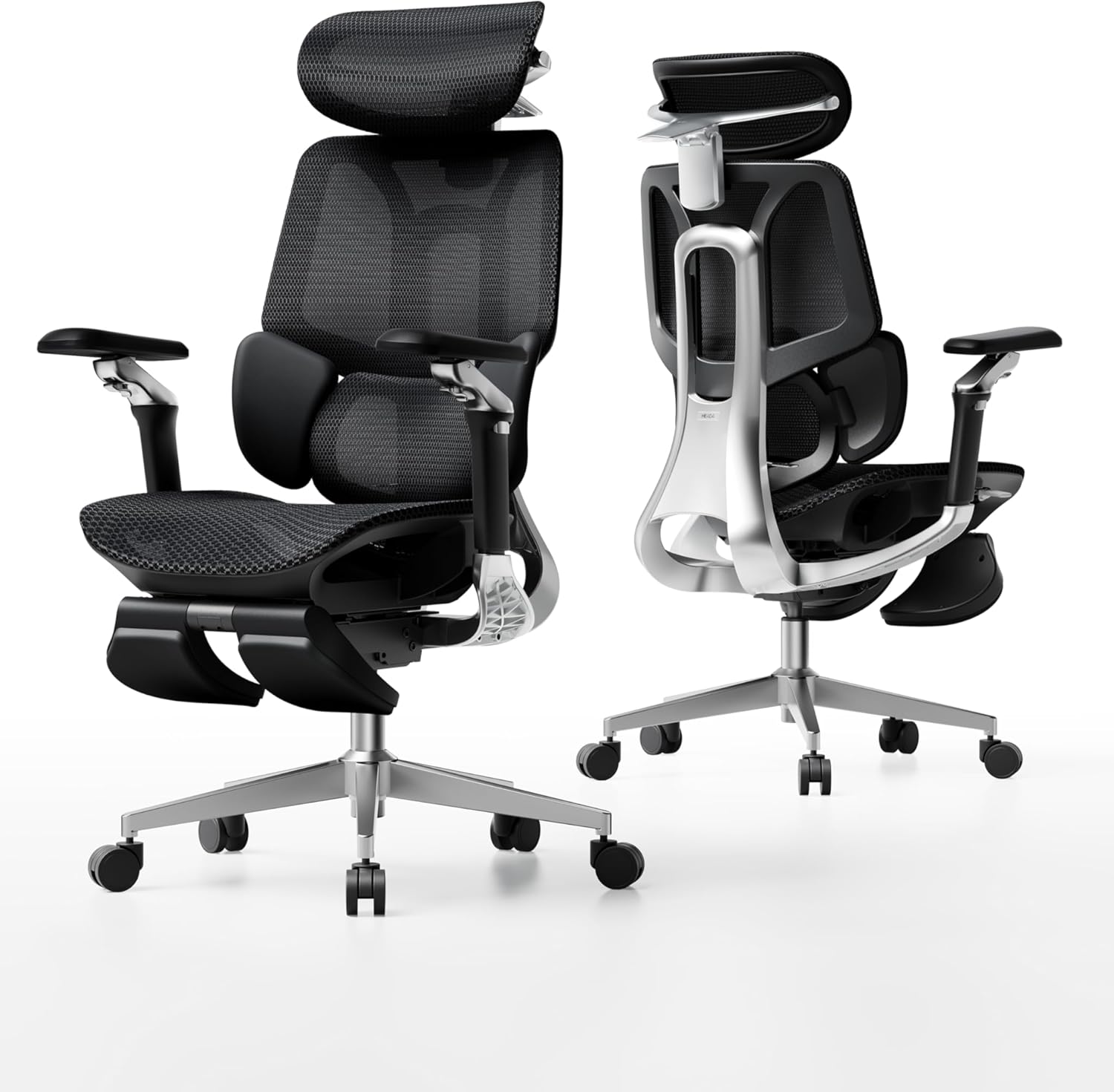
Hbada E3 Pro
Potentially suited to: People who prioritize accessible chair adjustments
The Hbada E3 Pro includes adjustable lumbar support, flip-up armrests, and a mesh design. Its adjustment controls are particularly worth examining if hand stiffness makes conventional controls difficult.
Notable features:
- Adjustable lumbar support
- Flip-up armrests
- Mesh construction
- Adjustable controls
- Accessible adjustment design
Why consider it: Flip-up armrests can also make getting into and out of the chair easier in some desk setups.
Things to consider: Verify the exact model and ASIN before purchasing, since the product information associated with this chair has appeared under more than one Amazon listing.
Amazon Basics Executive High-Back
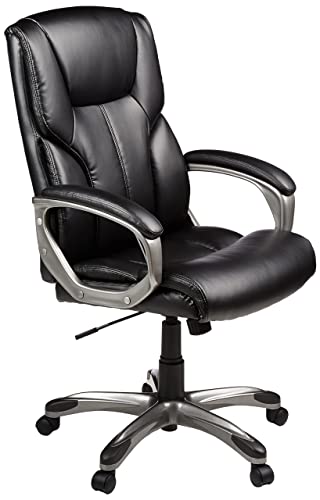
Potentially suited to: People looking for a simpler, more conventional office chair
The Amazon Basics Executive High-Back uses a padded design rather than the mesh-heavy approach of several chairs above.
Notable features:
- Padded seat
- Padded armrests
- Basic lumbar support
- Foam cushioning
- Straightforward controls
Why consider it: If you prefer a conventional padded office chair and do not need extensive ergonomic adjustments, a simpler design may be sufficient.
Things to consider: The adjustment range is more limited than on the higher-end ergonomic chairs in this comparison.
How to Choose an Office Chair for Arthritis
Before choosing a specific model, work through these questions.
1. What bothers you most when sitting?
Is it:
- Hip pressure?
- Knee discomfort?
- Lower-back discomfort?
- Shoulder tension?
- Wrist or hand pain?
- General stiffness?
- Difficulty getting in and out of the chair?
Start with the problem rather than the chair.
2. Do you prefer mesh or a padded seat?
Mesh chairs generally feel different from thick foam seats.
Mesh may appeal to you if you prefer:
- A firmer, less cushioned feel
- More airflow
- A supportive but flexible seat
Padded seating may appeal to you if you prefer:
- A softer feel
- More cushioning
- A traditional office-chair design
Neither is automatically better for arthritis.
3. Can you operate the controls?
This is easy to overlook when shopping online.
If you have finger stiffness or reduced grip strength, examine the shape and location of every adjustment lever. A chair that requires substantial force to operate a control may become frustrating.
4. Can you get your feet into a comfortable position?
After adjusting the chair height, your feet should be comfortably supported rather than dangling.
If the chair cannot be lowered enough for your feet to reach the floor comfortably, an adjustable footrest may help.
5. Can you sit back without the seat pressing behind your knees?
Seat depth matters just as much as seat height.
If you cannot sit comfortably against the backrest without the front of the seat pressing into your legs, the chair may not be the right size or design for you.
How to Test an Office Chair Before Buying
If you can try the chair in person, do not judge it after sitting for 30 seconds.
Spend several minutes adjusting:
- Seat height
- Seat depth, if available
- Lumbar support
- Armrests
- Recline tension
- Backrest position
Then sit normally rather than trying to maintain a deliberately “perfect” posture.
Pay attention to:
- Pressure beneath your thighs
- Pressure around your hips
- Whether your shoulders can relax
- Whether your lower back feels supported
- Whether your feet remain comfortably supported
- Whether the armrests interfere with your desk
- Whether the controls are easy to operate
If you are ordering online, check the dimensions, adjustment range, weight capacity, and return policy before purchasing.
A return policy can be particularly important with office chairs because comfort and fit cannot always be predicted from specifications alone.
Helpful Add-Ons for an Arthritis-Friendly Desk
The chair is only part of the sitting setup.
Depending on your needs, these accessories may also be useful:
Adjustable Footrest
A footrest can help if your chair needs to be higher for your desk but then leaves your feet unsupported.
Seat Cushion
An additional cushion may change the feel of a chair, although adding one can also change your effective seat height and seat depth.
Lumbar Cushion
A separate lumbar cushion can provide another way to modify a chair that does not have enough adjustment.
Keyboard Tray
A keyboard tray may help position the keyboard and mouse so that you do not have to reach as far forward.
Standing Desk Converter
Alternating between sitting and standing can provide a useful change of position during the workday if standing is comfortable for you.
Common Office Chair Buying Mistakes
Choosing a Chair Based Only on Price
A cheap chair is not necessarily a bargain if its dimensions or adjustments do not fit you.
Likewise, paying more does not guarantee that a chair will be comfortable for your particular body.
Focusing Only on Lumbar Support
Lumbar support gets a lot of attention in ergonomic chair marketing, but it is only one part of the equation.
Seat depth, seat height, armrests, cushioning, and adjustability can be equally important depending on your symptoms.
Ignoring the Armrests
Armrests that are too high can leave your shoulders elevated. Armrests that are too low may provide little useful support.
If shoulder, elbow, or wrist discomfort is part of your problem, pay close attention to armrest adjustment.
Buying a Chair With Too Many Features
More adjustment is not automatically better.
If you only need seat-height adjustment, comfortable cushioning, and basic lumbar support, paying considerably more for dozens of additional adjustments may not provide much practical benefit.
Choosing Based on Appearance
A chair can look impressive in photographs and still be uncomfortable after an hour.
Dimensions and adjustability are more useful buying criteria than appearance alone.
Forgetting the Desk
Even a well-adjusted chair can become uncomfortable if the desk is too high or too low.
Your chair, desk, keyboard, mouse, and monitor all work together. Adjusting only the chair may not solve a problem caused elsewhere in the setup.
Frequently Asked Questions
Can an office chair make arthritis pain worse?
It can contribute to discomfort if the chair does not fit your body or forces you into an uncomfortable position.
For example, a seat that is too deep may put pressure behind your knees, while poorly positioned armrests may leave your shoulders elevated.
That does not mean a particular chair causes arthritis. It means that an unsuitable workstation setup can contribute to discomfort during prolonged sitting.
Is a mesh office chair better for arthritis?
Not necessarily.
Mesh can provide a firmer, more breathable sitting surface, while padded or foam seats may feel more comfortable to people who prefer additional cushioning.
Your body and personal preference matter more than whether the chair is made from mesh or foam.
Are gaming chairs good for arthritis?
Some gaming chairs have useful adjustment features, but the gaming label itself does not make a chair appropriate for arthritis.
Look at the actual seat dimensions, cushioning, lumbar support, armrests, recline range, and controls.
What is the most important office chair feature for arthritis?
There is no single feature that is most important for everyone.
If lower-back discomfort is your primary problem, lumbar adjustment may matter most. If your shoulders are affected, adjustable armrests may be more important. If your hips are sensitive, seat cushioning and depth may deserve greater attention.
Should I use a footrest with an ergonomic office chair?
A footrest can be useful if your chair needs to be raised to a comfortable working height but your feet no longer rest comfortably on the floor.
Choose an adjustable footrest when possible so you can find a comfortable position rather than forcing your legs into a fixed angle.
How often should I change positions while sitting?
There is no single interval that works for everyone. Instead of trying to maintain one posture for hours, use the chair’s recline and tilt functions and change position when your body begins to feel uncomfortable.
If you can comfortably alternate between sitting, standing, and short periods of movement, that may be more practical than remaining in one position throughout the day.
Bottom Line
The best ergonomic office chair for arthritis is the one that fits your body, your workspace, and the joints that give you the most trouble.
Start with the features that address your biggest problem:
- Hip discomfort: look closely at cushioning, seat depth, and the front edge of the seat.
- Knee discomfort: prioritize adjustable seat height and depth.
- Lower-back discomfort: look for adjustable lumbar support and recline.
- Shoulder or elbow discomfort: prioritize adjustable, comfortable armrests.
- Hand or finger arthritis: make sure the adjustment controls are easy to operate.
- General stiffness: look for a chair that lets you change position comfortably.
You do not necessarily need the most expensive chair or the chair with the greatest number of adjustments. You need a chair that you can adjust to your body and comfortably use throughout your workday.
Related Reading
- Ergonomic Office Setup for Arthritis: How to Make Your Desk More Comfortable
- Smart Home Gadgets That Can Make Life Easier With Arthritis
- Arthritis-Friendly Tools and Products for Daily Living
- Mobility Aids for Arthritis: Complete Guide
Medical Disclaimer: This article is for informational purposes only and does not constitute medical advice. Always consult your doctor, rheumatologist, or occupational therapist before making changes to how you manage your arthritis.
